Data logger
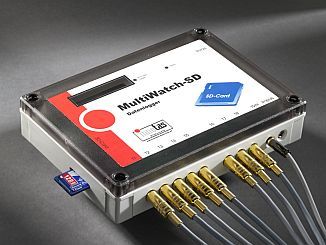
The Multiwatch-SD data logger allows you to measure, display, and record nine temperatures and one humidity level to an SD card. The measurement interval can be set between one and 99 minutes. The data logger also features a separate input for event counting, which can be used, for example, for energy or flow measurement. The measured values are written to an SD memory card. The memory card can be transferred to your PC using a standard card reader and further processed with programs such as MS Excel or similar software. No special software is required. The memory card can be easily removed from the device and sent to the analyst, for example, by mail. Each data record includes the measurement time for identification purposes. A real-time clock is integrated into the device for this purpose. This clock continues to run even when the battery is changed.
Furthermore, the device features temperature monitoring of the first measuring point with signaling via a potential-free relay contact.
The MultiWatch-SD is characterized by the following features:
• Records up to 171,000 data points with time, 9 temperature values, 1 humidity value and 1 counter value onto a standard 16MB SD card
• No PC connection to the device and no special software are required
• Data transfer of measurement data via SD card sharing
• The data can be read via a card reader, e.g. with MS-Excel.
• The device features a real-time clock and LCD display to show current measurements.
• The recording interval is freely selectable between 1 and 99 minutes.
• temperature stable
• Digital calibration, minimal deviation due to alternation of BE